
 EN
EN
Choosing the right storage architecture is one of the most consequential infrastructure decisions an IT team can make. Whether you are building a private cloud environment, managing a growing virtualization cluster, or simply trying to bring order to chaotic data sprawl, the choice between Storage Area Network, Network Attached Storage, and Direct Attached Storage shapes everything from performance headroom to operational flexibility. Each model carries distinct assumptions about how data flows, how resources are shared, and how your environment will scale over time. Understanding those distinctions before committing to hardware and cabling is far more cost-effective than discovering architectural mismatches after deployment.
This article works through the selection logic systematically, examining the workload characteristics, connectivity requirements, management complexity, and economic trade-offs that make one architecture the smarter fit for a given scenario. If you are evaluating SAN infrastructure specifically, the role of the SAN switch deserves careful attention, because it is the device that makes block-level storage networking both possible and manageable at scale. By the end of this discussion, you will have a practical framework for matching the right storage model to the real demands of your workloads.
Understanding the Core Differences Between SAN, NAS, and DAS
What Each Architecture Actually Does
Direct Attached Storage is exactly what its name implies: storage devices physically connected to a single server or workstation with no intermediary network fabric. This could be internal hard drives, external USB or SAS arrays, or NVMe drives mounted directly in the host. DAS delivers low latency because there is no network hop, but it creates storage silos. Each server owns its own storage, and sharing that capacity with other hosts requires additional software layers or data movement, which introduces complexity and delay.
Network Attached Storage introduces a dedicated file server that exports shared directories over a standard IP network using protocols such as NFS, SMB, or CIFS. Multiple clients access the same file system simultaneously, which makes NAS ideal for collaborative environments, media repositories, home directories, and backup targets. The storage appears to the operating system as a remote file system, and performance is bounded by network bandwidth and the latency inherent in file-based access protocols.
A Storage Area Network takes a fundamentally different approach by creating a dedicated high-speed network exclusively for storage traffic. Servers attach to the SAN fabric through host bus adapters and see storage volumes as if they were local block devices. This block-level access is critical for workloads that require direct disk I/O without a file system intermediary, including most enterprise databases, virtualization hypervisors, and transactional applications. The SAN switch is the central interconnection device that routes Fibre Channel or Ethernet storage frames between servers and storage arrays within this dedicated fabric.
Protocol and Transport Layer Distinctions
DAS uses direct bus interfaces such as SAS, SATA, NVMe, or older SCSI. These are deterministic, low-overhead transports that maximize throughput for a single host. NAS relies on TCP/IP networking and file-sharing protocols layered on top of that, meaning storage performance is subject to all the variability of a general-purpose network unless quality-of-service policies are enforced carefully.
SAN typically leverages Fibre Channel as its transport, though iSCSI over Ethernet and Fibre Channel over Ethernet are increasingly common alternatives. Fibre Channel specifically was designed from the ground up for storage traffic, offering deterministic latency, built-in flow control, and lossless delivery. The SAN switch in a Fibre Channel environment performs zoning, which is the logical segmentation of the fabric so that only authorized host-to-storage paths are visible. This is both a security feature and a performance isolation mechanism that keeps workloads from interfering with each other at the fabric level.
Matching Architecture to Workload Characteristics
When DAS Is the Right Tool
DAS remains relevant and often optimal for single-server workloads where sharing is not a requirement and absolute I/O performance is the priority. High-performance analytics nodes, dedicated rendering servers, edge computing deployments, and development workstations all benefit from DAS because the absence of a network layer eliminates latency variability. When a workload runs on a single host and that host is unlikely to be migrated or load-balanced, DAS avoids the cost and complexity of shared storage infrastructure without sacrificing anything meaningful.
DAS is also a logical starting point for organizations early in their infrastructure journey. The capital cost is lower, the configuration is simpler, and the operational burden is minimal. The challenge appears when growth happens: adding servers means either duplicating storage or retrofitting a shared storage model, which often proves more disruptive than building shared storage from the start. If your roadmap includes virtualization, high availability clustering, or rapid server provisioning, investing in shared storage architecture earlier usually pays for itself in avoided migration work.
When NAS Aligns with the Workload
NAS excels in environments where unstructured data must be accessed concurrently by many users or systems. File collaboration, media asset management, software build systems, and backup infrastructure are natural fits because these workloads tolerate file-based access semantics and do not require the tight I/O control that block storage provides. The ability to share a single storage pool across dozens or hundreds of clients without deploying dedicated storage per host makes NAS economically attractive at scale for file-centric workloads.
Modern NAS platforms also support rich data management features including snapshots, replication, deduplication, and tiering, which add value for long-term data retention scenarios. However, NAS is not ideal for latency-sensitive transactional databases, large-scale virtual machine deployments that require consistent sub-millisecond I/O, or any workload that depends on raw block device semantics. Trying to force those workloads onto NAS typically results in performance problems that are difficult to diagnose and expensive to resolve after the fact.
When SAN Architecture Delivers the Most Value
SAN is purpose-built for environments where multiple servers must share high-performance block storage with predictable latency and the ability to migrate workloads transparently between hosts. Enterprise database clusters, VMware and Hyper-V virtualization farms, Oracle RAC deployments, and mission-critical transactional systems all depend on SAN characteristics. The SAN switch is what enables this shared fabric model, allowing dozens of servers and multiple storage arrays to be interconnected in a topology that supports both redundancy and performance isolation simultaneously.
The SAN switch also provides the operational foundation for advanced features like live storage migration, automated storage tiering, and non-disruptive volume expansion. Zoning policies enforced at the SAN switch level ensure that a test server cannot accidentally see production storage volumes, and multipathing configurations defined through the fabric provide automatic failover if a path between a host and an array is interrupted. These capabilities are simply not available in DAS or NAS architectures, which is why SAN remains the dominant choice for tier-one enterprise workloads despite its higher initial deployment complexity.
Evaluating Total Cost of Ownership Across All Three Models
Capital and Infrastructure Costs
DAS has the lowest entry cost because it requires only the storage devices themselves and a local interface. There is no switching fabric, no dedicated cabling plant, and no additional management software to license. For small environments with predictable, static workloads, this simplicity is genuinely valuable. The cost ceiling, however, comes from the inefficiency of siloed storage. When each server maintains its own storage pool, utilization averages tend to be low because each pool must be sized for peak demand rather than average demand across a shared resource.
NAS adds the cost of a dedicated NAS appliance and standard network infrastructure, but shares that cost across all the clients that use it. Modern IP networks used for NAS connectivity are inexpensive because they leverage commodity Ethernet hardware. A high-quality NAS deployment can deliver excellent value for file workloads, and the management interface is typically far simpler than SAN administration. The trade-off is that NAS shares bandwidth with other network traffic unless dedicated storage VLANs or separate physical interfaces are used.
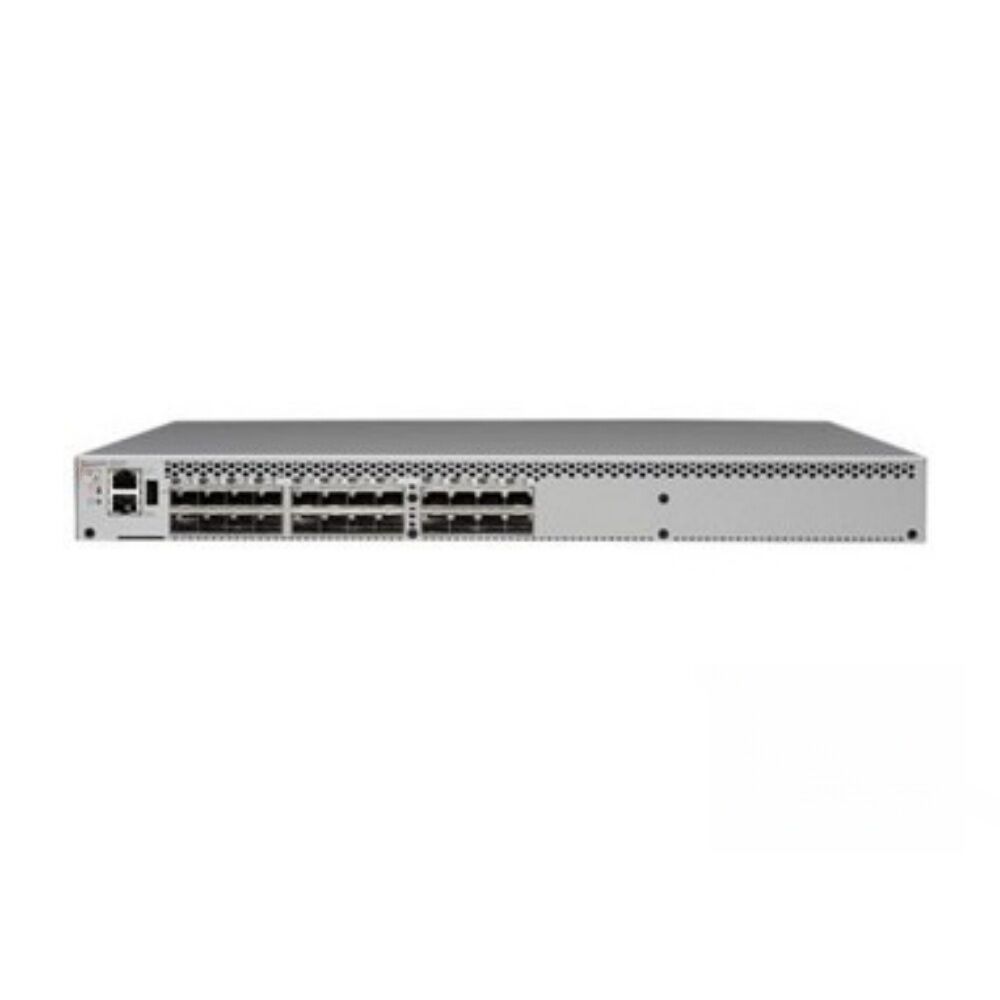
SAN carries the highest infrastructure cost because it requires host bus adapters in every server, dedicated Fibre Channel or iSCSI cabling, a SAN switch for every node of the fabric, and a storage array designed for block-level access. An entry-level SAN switch such as the BR-6505 can bring meaningful SAN capability into smaller deployments without requiring the same investment as fully modular enterprise directors, making SAN more accessible for mid-market environments building private cloud storage. The cost is justified when the workloads genuinely require what SAN provides, but deploying SAN infrastructure to serve primarily file-sharing workloads is an expensive mismatch.
Operational Complexity and Skill Requirements
DAS requires the least operational expertise. Storage is managed as part of the individual server, and most administrators who can manage a server can manage its attached storage. NAS administration requires understanding of file-sharing protocols, network configuration, and storage appliance management, but these skills are widely available and the administrative interfaces on modern NAS platforms are designed for accessibility. Troubleshooting NAS performance issues, however, can become complex when network congestion and file system layer interactions need to be analyzed together.
SAN administration requires specialized knowledge of Fibre Channel fabric concepts, zoning configuration, multipath I/O drivers, and storage array management. The SAN switch is typically the device where zoning policies are administered, and errors in zoning can cause subtle connectivity issues that take time to diagnose. Investing in proper training for SAN administrators pays dividends in avoiding configuration mistakes that cause production outages. The operational complexity is a real cost that should be factored into total cost of ownership calculations alongside hardware pricing.
Scalability and Future-Proofing Your Storage Decision
How Each Architecture Scales
DAS scales vertically, meaning you add capacity to individual servers. At some point this becomes impractical, either because the server chassis runs out of drive bays, because the performance of local storage cannot keep up with application growth, or because the operational burden of managing separate storage pools on dozens of servers becomes untenable. DAS rarely scales elegantly in multi-server environments without a significant architectural rethinking.
NAS scales well for file capacity, and modern NAS platforms support clustering configurations that allow both capacity and performance to grow by adding nodes to the cluster. For file workloads that grow in volume rather than I/O intensity, NAS provides a natural and cost-effective expansion path. Where NAS struggles is in scaling to meet the I/O demands of transactional workloads, because the file system layer introduces overhead that cannot be eliminated regardless of how much hardware is added.
SAN scales in multiple dimensions simultaneously. Additional storage arrays can be connected to the fabric, new servers can be added as hosts, and additional SAN switch devices can be interconnected to expand the fabric topology. Fibre Channel fabrics support inter-switch links that allow separate switch domains to share resources and routing tables, giving large environments the ability to grow the fabric without redesigning it. For enterprises expecting significant workload growth or frequent server provisioning cycles, SAN's scalability model is a significant advantage over both NAS and DAS.
Cloud Hybrid and Private Cloud Considerations
As organizations increasingly build private cloud environments using virtualization platforms, the storage architecture question takes on additional dimensions. VMware environments with vSphere, vMotion, and vSAN capabilities depend on shared block storage to support live migration of virtual machines between hosts. Without a shared storage fabric, live migration is unavailable and high availability features cannot function as designed. The SAN switch is a foundational component of any VMware infrastructure deployment that takes availability seriously.
Hybrid cloud architectures that combine on-premises SAN infrastructure with cloud storage tiers benefit from the consistency that SAN provides for primary workloads while using object storage or NAS-based cloud volumes for secondary or archival data. The division of responsibility between SAN for performance-sensitive primary data and other storage tiers for capacity-optimized secondary data reflects a mature approach to multi-tier storage architecture that balances cost against performance requirements across the data lifecycle.
Practical Selection Criteria Summary
Decision Factors to Evaluate Before Choosing
The most important factor in the selection process is accurately characterizing the I/O profile of your workloads. Transactional databases, virtualization hypervisors, and applications that issue frequent small random I/O operations at low latency requirements are SAN workloads. File repositories, backup targets, collaborative editing environments, and media archives are NAS workloads. Single-server applications with predictable, local access patterns are DAS workloads. Misidentifying the I/O profile is the most common source of architecture mismatch.
Sharing requirements are equally decisive. If multiple hosts must access the same storage volumes or file systems simultaneously, DAS is eliminated. If the access pattern is file-based and latency tolerant, NAS is the natural choice. If the access pattern requires block-level semantics and consistent low latency across shared volumes, SAN is the correct answer. The SAN switch becomes a required investment the moment you need to share block storage across more than two hosts in a reliable, manageable way.
Availability and redundancy requirements also shape the selection. SAN fabrics with redundant SAN switch devices and multipathing eliminate single points of failure across the entire storage path. NAS appliances can be clustered for high availability but the file protocol layer introduces recovery time constraints that block storage avoids. DAS provides no inherent path redundancy and relies entirely on the host server for availability, making it unsuitable for applications that require continuous uptime without scheduled maintenance windows.
Building a Tiered Storage Strategy
Many mature environments do not choose a single architecture but instead deploy a tiered strategy where each architecture type serves the workloads it fits best. Tier-one production databases and virtual machine datastores run on SAN infrastructure with a dedicated SAN switch fabric for maximum performance and availability. File sharing, home directories, and departmental archives run on NAS. Development servers, edge nodes, and single-purpose appliances use DAS where sharing is not needed. This tiered approach optimizes cost by avoiding over-engineering of low-criticality workloads while ensuring that mission-critical systems receive the infrastructure quality they require.
Designing a tiered strategy requires honest workload classification and a willingness to resist the temptation to standardize on a single architecture simply for administrative uniformity. Each tier should be sized and designed based on the actual demands of the workloads assigned to it, with clear migration criteria defined for when a workload should be promoted to a higher tier as its requirements grow. Revisiting those classifications annually ensures that the storage architecture continues to match the workloads it serves as both the applications and the available technology evolve.
FAQ
What types of workloads most commonly require a SAN switch?
Workloads that benefit most from SAN infrastructure and therefore require a SAN switch include enterprise relational databases, VMware and Hyper-V virtualization clusters, Oracle RAC configurations, and any application that issues high volumes of small random block I/O at latency-sensitive thresholds. The SAN switch provides the shared fabric connectivity that allows multiple servers to access the same storage array with consistent performance and path redundancy. Without the SAN switch, there is no fabric, and the shared block storage model cannot function.
Can a small or mid-market business justify investing in a SAN switch?
Yes, particularly if the environment runs virtualization or requires high availability for any production workload. Entry-level SAN switch products are designed specifically to bring SAN capability to smaller deployments without the cost and complexity of fully modular enterprise fabric directors. If a business runs more than two or three servers, uses VMware or Hyper-V for consolidation, or cannot afford unplanned downtime on production systems, the cost of a SAN switch is generally justified by the operational and availability benefits it delivers.
How does iSCSI compare to Fibre Channel as a SAN transport protocol?
iSCSI runs block storage protocols over standard Ethernet infrastructure, which reduces the hardware cost by eliminating the need for dedicated Fibre Channel adapters and specialized cabling. It is a viable SAN transport for environments where latency requirements are moderate and existing Ethernet infrastructure is already in place. Fibre Channel remains preferred for the highest-performance, most latency-sensitive workloads because it was designed exclusively for storage traffic and provides deterministic delivery characteristics that Ethernet inherits only through careful QoS configuration. The choice between the two depends on performance requirements and the cost tolerance for dedicated versus converged networking infrastructure.
What happens when a SAN switch fails and how is that risk managed?
A single SAN switch failure will interrupt connectivity between servers and storage arrays unless redundancy has been designed into the fabric. Best practice for production SAN deployments is to use at least two independent SAN switch devices in separate failure domains, with each server having host bus adapters connected to both switches and multipath I/O software configured in the operating system. This dual-fabric design ensures that the loss of any single SAN switch does not cause a storage path outage, because all hosts automatically continue operating through the surviving switch without intervention or data loss.