
 EN
EN
As organizations push the boundaries of artificial intelligence, deep learning, scientific simulation, and real-time rendering, the demand for powerful compute infrastructure has never been greater. At the center of this transformation are high-end GPU installations, where raw processing capability must be matched by equally robust thermal management and power delivery systems. Without the right engineering foundations in place, even the most advanced graphics processing units can quickly become throttled, unstable, or permanently damaged — and the cost of that failure in enterprise environments can be enormous.
Understanding what cooling and power supply considerations are truly critical for high-end GPU installations requires a detailed look at both the hardware environment and the operational demands being placed on the system. Whether you are deploying a single workstation or scaling up a multi-GPU server rack for production workloads, the principles governing thermal control and power integrity remain the same. This article breaks down the key factors engineers and IT procurement teams must evaluate before, during, and after deployment.
The Thermal Demands of High-End GPU Hardware
Understanding GPU Thermal Design Power
Every GPU is rated with a Thermal Design Power (TDP) figure that represents the maximum sustained heat output the cooling solution must handle. For modern professional-grade and compute-oriented GPUs, these values can range from 200W to over 700W per card. In high-end GPU installations where multiple cards are deployed in parallel, the aggregate heat load can easily exceed several kilowatts within a single chassis, making thermal planning a primary engineering concern rather than an afterthought.
When TDP thresholds are not adequately managed, GPUs enter thermal throttling states where clock speeds are automatically reduced to protect the silicon. This causes a measurable and sometimes dramatic decline in computational throughput, which directly undermines the business case for investing in premium hardware. In AI training workloads where iteration time is critical, even brief thermal throttling events can add hours to a training cycle. For high-end GPU installations in data center environments, uncontrolled thermal behavior is simply not acceptable.
Engineers must account not only for the GPU's own heat output but also for the ambient thermal contribution from CPUs, memory modules, storage devices, and voltage regulation modules sharing the same enclosure. The total thermal envelope of the system is always higher than the sum of individual component TDPs alone, due to localized airflow resistance and heat recirculation effects within densely populated chassis.
Cooling Architecture Options for Dense GPU Environments
The most widely used cooling approach in enterprise high-end GPU installations is active air cooling, which relies on high-speed fans, structured airflow paths, and strategic venting to move heat out of the chassis. Server platforms designed specifically for GPU workloads typically feature front-to-back airflow configurations, with hot-swap fan modules positioned to maintain adequate static pressure even at extreme load. Selecting a chassis with the correct airflow architecture for the number and layout of GPUs installed is a foundational decision.
Liquid cooling has become an increasingly viable alternative for the highest-density deployments. Direct liquid cooling (DLC) and immersion cooling solutions can dramatically reduce the thermal resistance between GPU die and cooling medium, enabling more consistent sustained performance without the acoustic and airflow limitations of traditional fan-based systems. However, liquid cooling infrastructure requires more significant upfront investment in facility preparation and ongoing maintenance protocols.
Regardless of cooling method, the physical spacing between GPU cards in a multi-GPU system has a profound effect on thermal performance. Cards installed too closely together can recirculate hot exhaust air back into adjacent intake zones, creating thermal hotspots. Platforms engineered specifically for high-end GPU installations address this by incorporating optimized slot spacing, directed airflow baffles, and GPU-specific thermal zones within the chassis design.
Power Supply Architecture and Capacity Planning
Calculating Total System Power Requirements
Sizing the power supply for high-end GPU installations begins with accurately calculating the total system power draw at peak load. This includes not just the sum of GPU TDP values but also the CPU package power, DRAM power, NVMe storage, PCIe infrastructure, BMC management subsystems, and fan power. A common mistake is to size the power supply based solely on GPU TDP, leaving insufficient headroom for these auxiliary loads and for the transient power spikes that occur during GPU kernel launches.
Power engineers recommend maintaining at least 20 to 30 percent headroom above the calculated peak system load when selecting a power supply unit. This margin serves multiple purposes: it prevents the PSU from operating at maximum rated efficiency point under sustained load, it provides capacity for transient spikes, and it ensures that slight variations in AC input voltage do not push the supply into overcurrent protection territory. For a four-GPU system with 400W cards, this headroom consideration alone can shift the required PSU capacity from 2000W to 2500W or beyond.
Enterprise platforms designed for high-end GPU installations often support redundant power supply configurations, where two or more PSUs share the system load and either unit can sustain operations if the other fails. This is a critical availability feature in production environments where GPU downtime has direct financial or operational consequences. Redundant PSU configurations also simplify planned maintenance, allowing a failed unit to be hot-swapped without powering down the server.
Power Delivery Efficiency and Voltage Stability
The efficiency rating of a power supply directly affects both operating costs and thermal output within the server rack. An 80 PLUS Titanium-rated PSU operating at 94 percent efficiency generates significantly less waste heat than an 80 PLUS Bronze unit at 85 percent efficiency, under the same load conditions. For high-end GPU installations operating 24 hours a day, 365 days a year, this efficiency differential translates into meaningful differences in electricity cost and in the cooling burden placed on the data center facility.
Voltage stability on the 12V rail is a particularly important parameter in GPU-intensive systems. Modern GPUs draw large, dynamic currents from the 12V supply, and any significant voltage droop under transient load conditions can cause system instability, unexpected resets, or data corruption in active computation. Server-grade power supplies engineered for high-end GPU installations are designed with tighter voltage regulation tolerances than consumer-grade alternatives, reducing the risk of these transient-induced failures.
Cable management and PCIe power connector quality also play underappreciated roles in power delivery integrity. High-resistance connectors or undersized cabling can introduce voltage drop between the PSU output and the GPU power input, effectively reducing the voltage seen at the card below the PSU's regulated output. In multi-GPU systems, the cumulative effect of poor power delivery infrastructure can contribute to instability that appears to be a cooling or GPU hardware issue but is actually a power pathway problem.
System-Level Integration for Stable GPU Operation
Chassis and Motherboard Platform Selection
The chassis and motherboard platform form the integration backbone of any high-end GPU installations project. A platform that is not engineered with GPU workloads in mind will often create thermal, power, and mechanical compatibility challenges that erode system performance and reliability. Key attributes to evaluate include the number and mechanical spacing of full-length, full-height, double-width PCIe slots, the PCIe lane topology from the CPU and chipset, and the chassis depth required to accommodate long-form GPU cards with aftermarket cooling solutions.
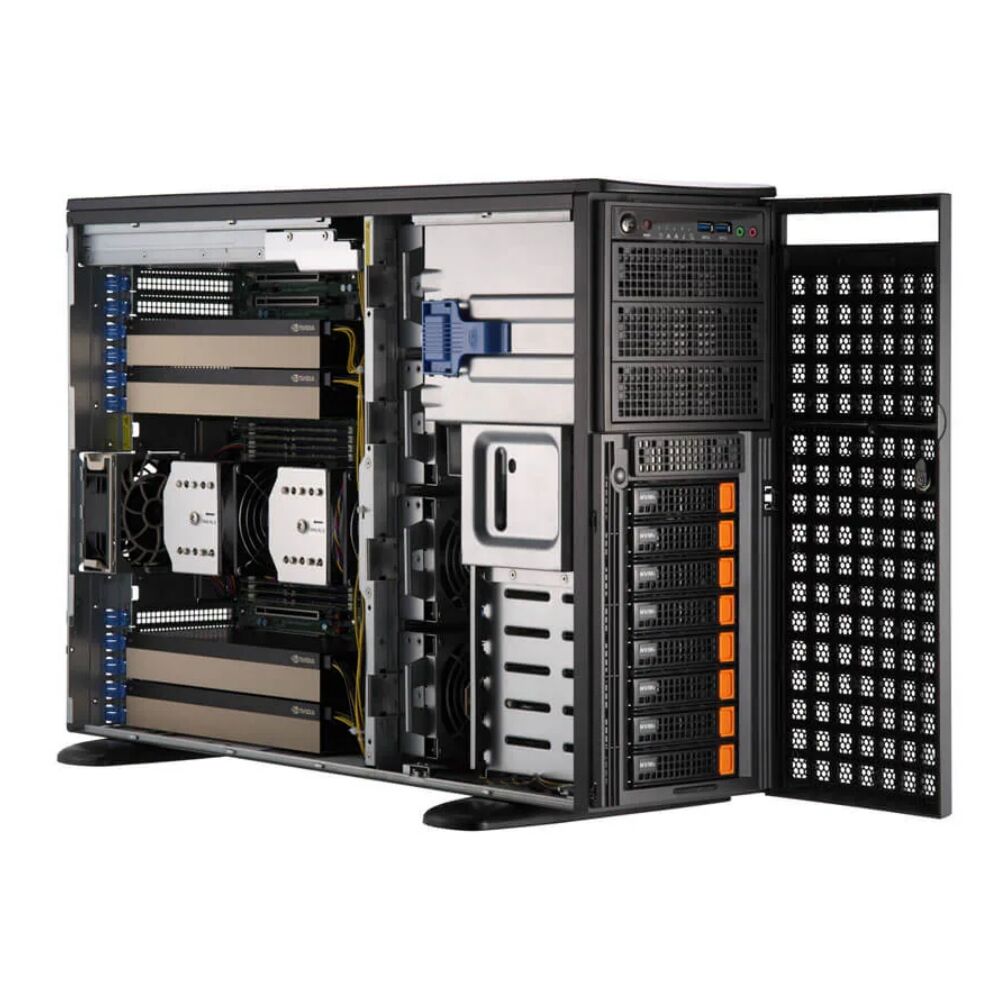
Some enterprise server platforms, such as those based on optimized GPU superserver designs, are purpose-built to address these integration challenges. They combine structured airflow, high-capacity power distribution, and optimized PCIe slot configurations in a single validated platform. Choosing a platform that has been tested and validated for GPU-intensive workloads significantly reduces the engineering risk compared to adapting a general-purpose server to a GPU-dense configuration.
For teams evaluating purpose-built platforms, the high-end GPU installations use case is directly addressed by systems like the Supermicro 741GE, which supports up to four PCIe GPUs in a chassis designed to handle the combined thermal and power demands of professional multi-GPU deployments. Evaluating platforms that were designed from the ground up for this use case is one of the most effective ways to reduce deployment risk.
BIOS, Firmware, and Operating System Configuration
Hardware selection alone does not guarantee stable operation in high-end GPU installations. BIOS and firmware configuration play a significant role in establishing the correct operating parameters for multi-GPU systems. Settings such as PCIe link width and speed, Above 4G Decoding support, Resizable BAR enablement, and power limit profiles must be correctly configured to ensure that GPUs operate at their intended performance levels without triggering compatibility or stability issues.
Above 4G Decoding, in particular, is a BIOS feature that must be enabled for modern high-memory GPUs to function correctly in multi-card configurations. Without this setting, some operating systems and GPU drivers will fail to correctly map the GPU's memory address space, resulting in reduced functionality or complete failure to initialize the card. This is a frequently overlooked configuration step in high-end GPU installations that are adapted from general-purpose server builds rather than purpose-designed GPU platforms.
At the operating system level, GPU power management profiles should be reviewed and configured for always-on, maximum performance states in production workload environments. Default OS power management settings may allow GPUs to enter low-power idle states that introduce latency when compute jobs are dispatched, which is undesirable in latency-sensitive inference pipelines or interactive rendering applications common in high-end GPU installations.
Monitoring, Maintenance, and Long-Term Reliability
Real-Time Thermal and Power Monitoring
Deploying a robust monitoring infrastructure is essential for maintaining the long-term reliability of high-end GPU installations. GPU management tools and platform management interfaces such as IPMI and Redfish provide real-time visibility into GPU junction temperature, fan speed, power consumption, and memory error rates. Establishing alert thresholds for these metrics allows operations teams to identify developing thermal or power problems before they escalate into hardware failures.
Tracking trends over time is equally important. A GPU that gradually increases its average operating temperature under identical workloads may be experiencing heatsink degradation, fan bearing wear, or dust accumulation in the cooling fins — all of which are addressable through preventive maintenance. Without trend monitoring, these gradual changes go undetected until the system crosses a critical threshold and triggers a failure event or emergency shutdown.
In enterprise environments running high-end GPU installations, integrating GPU telemetry into centralized infrastructure monitoring platforms enables correlation between compute resource utilization, thermal behavior, and power consumption. This integration supports both proactive capacity planning and root-cause analysis when performance anomalies occur.
Preventive Maintenance and Lifecycle Planning
The operational lifespan of components in high-end GPU installations is closely tied to the consistency of the thermal environment they operate in. Sustained high-temperature operation accelerates electromigration in GPU interconnects, degrades thermal interface materials between die and heatsink, and shortens the mechanical lifespan of fan bearings. Establishing a regular preventive maintenance schedule — including thermal compound replacement, fan inspection, and chassis cleaning — is a fundamental practice in any professionally managed GPU deployment.
Power supply units in high-end GPU installations should be evaluated for replacement at intervals consistent with their rated MTBF specifications and actual operating hours. Running a PSU beyond its design life in a high-load environment significantly increases the risk of capacitor degradation, which can manifest as increased ripple on the output rails and eventually as unexpected shutdowns or voltage regulation failures. Proactive PSU replacement is far less disruptive and costly than emergency replacement following a system failure.
Lifecycle planning for high-end GPU installations should also account for the thermal and power implications of GPU upgrades. When replacing first-generation cards with newer, higher-TDP models mid-lifecycle, the existing cooling and power infrastructure must be re-evaluated to confirm it can support the updated thermal and electrical demands. Assuming backward compatibility without reassessment is a common source of post-upgrade reliability problems.
FAQ
What is the recommended temperature range for GPUs in a multi-card installation?
Most professional-grade GPUs are designed to operate safely with junction temperatures up to approximately 83–95°C depending on the model, but sustained operation near maximum temperature limits accelerates component aging. For long-term reliability in high-end GPU installations, engineering the cooling system to maintain average GPU temperatures below 75–80°C under full sustained load is a widely recommended practice that provides meaningful thermal headroom and extends hardware lifespan.
How much power supply headroom is recommended for a four-GPU server?
For a four-GPU system, a minimum of 20 to 30 percent headroom above calculated peak system load is recommended. This accounts for transient power spikes during GPU kernel launches, auxiliary system loads, and ensures the PSU does not operate continuously at its maximum rated capacity. In practice, many engineers deploying high-end GPU installations with high-TDP cards will size the power supply at 2500W or higher even when theoretical peak load calculates to 2000W.
Does airflow direction matter in a GPU server chassis?
Airflow direction is critically important in any high-end GPU installations chassis. Most enterprise server platforms use a front-to-back airflow model, where cool air enters from the front of the rack and hot exhaust exits at the rear. Installing GPUs, fans, or blanking panels in a way that disrupts this intended airflow path can create recirculation of hot exhaust, hot spots, and significantly elevated GPU temperatures even when the total cooling capacity of the system appears adequate.
Can consumer-grade power supplies be used in professional GPU server builds?
Consumer-grade power supplies are generally not recommended for professional high-end GPU installations. They typically lack the tighter voltage regulation tolerances, redundancy options, hot-swap capability, and high-efficiency ratings required in enterprise environments. More critically, many consumer PSUs are not rated for the sustained 24/7 operation at near-maximum load that is common in GPU compute workloads, which significantly increases the risk of premature failure and system downtime.