
 EN
EN
Choosing the right hard drive for a specific application is one of the most consequential infrastructure decisions a business can make. Whether you are configuring a database server, a virtualization cluster, a media archive, or a transactional workload environment, the storage subsystem directly shapes application responsiveness, data throughput, and long-term operational costs. A mismatch between workload demands and hard drive specifications can result in bottlenecks, premature hardware failure, and expensive re-provisioning down the road. Understanding how to evaluate capacity, rotational speed, and cache in a coherent, application-centric way is therefore not optional — it is foundational to sound IT planning.
The challenge is that no single hard drive specification works universally across all workloads. A high-frequency transactional database has entirely different storage needs than a video surveillance archive or a backup repository. The right approach is to match each specification dimension — capacity, speed (RPM and interface), and cache — to the actual I/O profile, data access patterns, and growth projections of your application. This guide walks through the selection logic in a structured and practical way, helping you make confident, well-justified storage decisions.
Understanding What Your Application Actually Demands From a Hard Drive
Analyzing I/O Profiles Before Choosing Any Specification
Before examining any hard drive specification sheet, the first step is profiling your application's I/O behavior. The key metrics are read/write ratio, I/O size (sequential versus random), queue depth, and latency sensitivity. A workload dominated by large sequential reads — such as video streaming or backup retrieval — tolerates slightly lower IOPS as long as sustained throughput is high. Conversely, a workload with heavy small random writes — like an OLTP database or a mail server — requires very different storage characteristics to function efficiently.
Transactional applications typically generate thousands of small I/O operations per second at unpredictable intervals. These workloads stress the rotational latency and seek time of a hard drive far more than raw sequential speed. Understanding this distinction allows you to prioritize the right specifications — in this case, high RPM and interface speed — rather than chasing maximum capacity or cache size alone.
Once you have a clear picture of your I/O profile, you can begin mapping those demands to storage specifications with purpose. This prevents over-specification in areas that add cost without benefit and under-specification in areas that create genuine performance gaps. Application profiling, even at a high level, transforms a generic purchasing decision into a precise engineering choice.
Matching Workload Categories to Storage Tiers
Industrial and enterprise workloads broadly fall into several storage tiers based on their performance requirements. Tier-1 workloads — including real-time analytics, financial transaction systems, and enterprise resource planning platforms — demand the highest performance from the hard drive layer, prioritizing low latency, high IOPS, and interface reliability above all else. These applications should be matched to high-RPM drives with enterprise-grade caching and wide-bandwidth interfaces like SAS.
Tier-2 workloads — such as file servers, email systems, and development environments — operate with moderate I/O demands. These applications benefit from a balanced hard drive selection that offers reasonable performance at a favorable cost-per-gigabyte ratio. The focus shifts toward capacity efficiency without sacrificing reliability. Tier-3 workloads, such as cold backups, compliance archives, and media libraries, place capacity and cost-per-terabyte at the center of selection decisions, accepting lower performance in exchange for scale.
Mapping your application to the appropriate tier creates a rational framework for all subsequent specification decisions. It ensures that budget is allocated where it generates real performance value rather than being spread evenly across all hard drive attributes regardless of application need.
Selecting the Right Hard Drive Capacity for Your Application
Planning for Current and Future Data Growth
Capacity selection requires looking beyond current storage consumption. A well-calibrated hard drive capacity decision accounts for immediate data volume, anticipated annual growth rates, data retention policies, and any redundancy configurations such as RAID that effectively reduce usable capacity. Undershooting on capacity forces premature expansion cycles that are costly in both hardware and operational labor. Overshooting adds unnecessary upfront cost and can reduce storage density efficiency in constrained chassis environments.
A practical planning horizon is typically two to three years. Estimate current raw data volume, apply projected annual growth — which for database-driven environments often ranges from 20 to 40 percent — and factor in the overhead introduced by your chosen RAID level. For example, a RAID-10 configuration effectively halves usable capacity relative to raw storage installed. This means a server requiring 10 TB of usable space might need 20 TB or more of raw hard drive capacity across the array.
It is also worth considering whether the application benefits more from fewer high-capacity drives or more moderate-capacity drives in a larger array. Wider arrays improve parallel I/O performance but consume more drive bays and increase complexity. The optimal balance depends on both performance targets and physical infrastructure constraints.
Capacity Density and Application-Specific Trade-offs
High-capacity hard drive options offer compelling cost-per-terabyte economics, particularly for workloads where capacity far outweighs performance as a priority. However, very high-capacity drives — especially those designed for nearline or archival use — often operate at lower RPMs, which introduces meaningful latency in random-access scenarios. Choosing a high-capacity drive for a performance-sensitive workload purely on storage economics is a common and costly mistake.
For applications where both capacity and performance matter simultaneously — such as analytics platforms that process large datasets with time-sensitive query requirements — the compromise lies in selecting a hard drive that balances density with adequate performance specifications. Mid-range capacity drives at high RPM often provide this balance, delivering sufficient throughput for moderately demanding workloads without the cost premium of pure performance-tier storage.
Capacity decisions should also consider the form factor. A 2.5-inch hard drive allows greater density in rack-mounted servers — more drives per rack unit — which is especially relevant when space efficiency is a constraint. Enterprise servers designed around 2.5-inch hot-swap bays can pack significant usable storage into a compact footprint, enabling high-capacity configurations without expanding the physical server estate.
Evaluating Hard Drive Speed: RPM, Interface, and Latency Implications
The Role of Rotational Speed in Application Performance
Rotational speed, measured in revolutions per minute (RPM), is one of the most direct determinants of a mechanical hard drive's latency and IOPS capacity. Higher RPM drives complete more rotations per second, which reduces the average rotational latency — the time a read/write head must wait for the target sector to rotate into position. For random I/O-intensive applications, this translates directly into more operations per second and more predictable response times.
10,000 RPM drives represent a strong performance tier for enterprise applications that require fast random access without moving fully into flash-based storage. A hard drive operating at 10K RPM typically delivers average rotational latency around 3 milliseconds, compared to approximately 4.2 milliseconds for a 7,200 RPM drive. While this difference appears marginal in isolation, under high queue-depth workloads where thousands of I/O operations are issued concurrently, the performance gap compounds significantly into measurable application latency improvements.
15,000 RPM drives push mechanical performance further still, but their higher cost, greater heat generation, and the growing competitiveness of flash alternatives have made 10K RPM the practical sweet spot for many enterprise mechanical storage deployments. The correct RPM selection depends on how latency-sensitive the application is and whether mechanical storage is the appropriate tier at all for the most demanding workloads.
Interface Selection: SAS Versus SATA for Enterprise Applications
The interface connecting a hard drive to the server backplane significantly affects available bandwidth, protocol reliability, and suitability for multi-initiator environments. Serial Attached SCSI (SAS) interfaces — particularly modern 12Gbps SAS — provide full-duplex connectivity, superior error handling, and support for dual-ported drives, which enables multi-path I/O configurations that are critical in high-availability storage environments. SAS drives are designed for continuous 24/7 operation under demanding enterprise workloads.
SATA interfaces offer higher-capacity drives at lower cost-per-gigabyte ratios, but they are limited to half-duplex operation and lack the robust command queuing and error recovery features found in SAS. For Tier-1 and Tier-2 workloads, a SAS hard drive is typically the correct selection. The investment in SAS interface quality pays dividends in data integrity, fault tolerance, and sustained throughput consistency under heavy, concurrent access patterns.
Additionally, the SAS protocol supports a broader native command set for enterprise storage management, which integrates more cleanly into RAID controllers and storage area network fabrics. For applications deployed in enterprise server environments with shared storage infrastructure, the manageability advantages of SAS extend well beyond raw bandwidth numbers, making interface selection an important consideration alongside RPM and capacity.
Understanding Cache Size and Its Impact on Hard Drive Application Fit
How Drive Cache Works and Why It Matters
The onboard cache of a hard drive — also called a buffer or disk cache — is a small pool of high-speed DRAM located directly on the drive's controller board. This cache serves multiple functions: it buffers incoming write commands to smooth out bursty write workloads, it stores recently read data for rapid re-access, and it facilitates read-ahead operations where the drive prefetches data it anticipates will be requested based on sequential access patterns. All of these functions reduce the frequency with which the mechanical platters must actually be accessed for a given I/O operation.
For workloads with repetitive access patterns — such as database query caches that frequently access the same index pages, or file servers where popular documents are repeatedly retrieved — a larger drive cache improves effective throughput measurably. The working set of frequently accessed data fits more fully within the cache, reducing physical seek operations and delivering sub-millisecond responses for cache-hit requests.
However, drive cache size should not be evaluated in isolation. The effectiveness of a large cache depends heavily on the access pattern. A hard drive handling purely random, non-repeating I/O — such as a high-entropy encryption workload or a write-once archive system — derives limited benefit from an oversized cache because cache hits are rare. In these scenarios, cache size becomes a secondary consideration relative to RPM and interface speed.
Matching Cache Specifications to Specific Application Types
Enterprise-grade hard drive products typically offer cache sizes ranging from 64MB to 256MB or more. For database servers running structured query workloads, a larger cache reduces the latency impact of frequently accessed metadata and index structures, improving query response consistency. For virtualization hosts running multiple virtual machines with overlapping I/O streams, a well-buffered drive cache helps smooth the aggregate I/O demand presented to the physical platter layer.
In write-intensive environments, it is important to understand how the hard drive's write cache is protected in the event of unexpected power loss. Enterprise drives operating in critical environments should be used within systems equipped with battery-backed RAID controllers or similar write-cache protection mechanisms. This ensures that data buffered in the drive's write cache is not lost before being committed to the magnetic platters, preserving data integrity under failure conditions.
For archival and backup applications, cache size has minimal practical impact on overall performance since these workloads are typically dominated by large sequential writes and reads where the drive's native sequential transfer rate matters far more than the depth of the write buffer. In this context, capacity and cost-per-terabyte become the dominant selection criteria, and cache specifications can be treated as secondary without meaningful performance sacrifice.
Bringing It Together: A Coherent Selection Framework for Your Application
Building a Specification Profile Around Application Requirements
A reliable hard drive selection process begins with a documented requirements profile that captures application type, I/O profile, capacity requirements, growth projections, reliability class, and deployment environment. This profile becomes the specification checklist against which candidate drives are evaluated. Rather than selecting a drive based on a single impressive specification, the selection is validated against the full requirement set simultaneously.
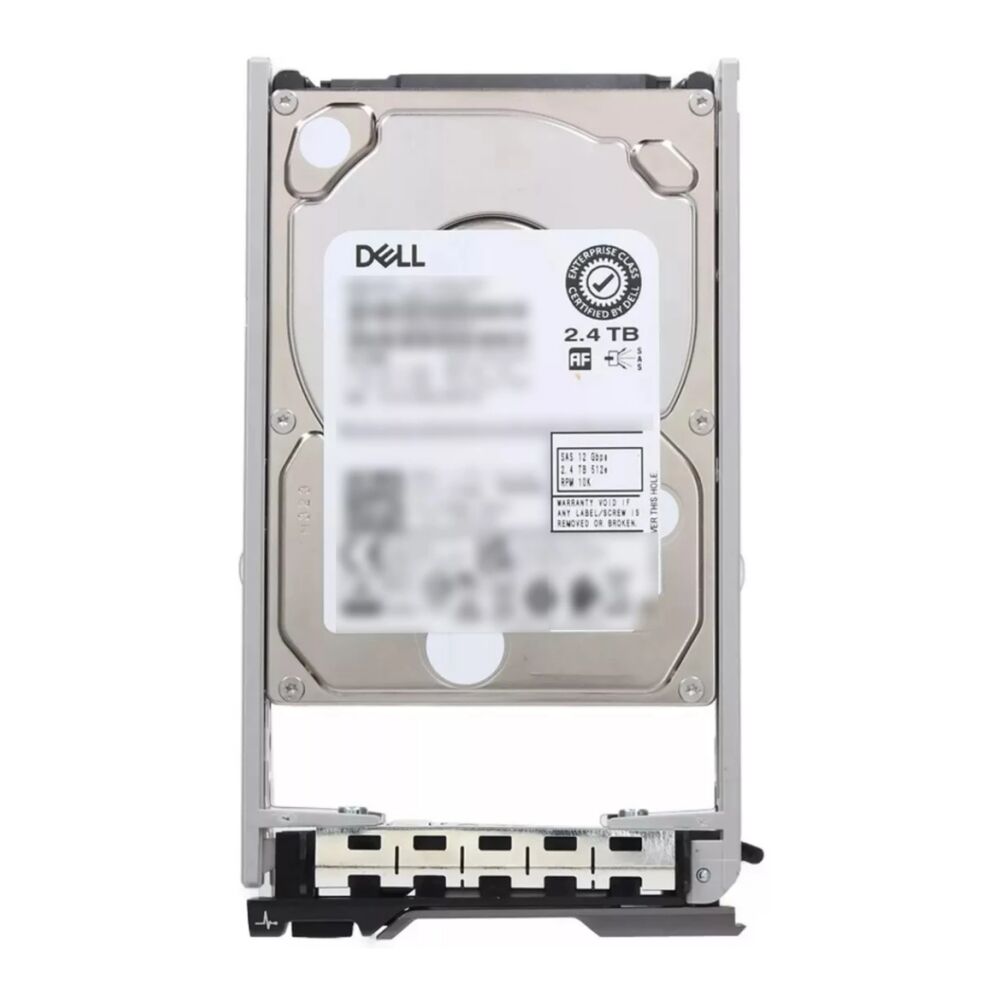
For a high-performance enterprise workload — such as a 2.4TB SAS 12Gbps 10K RPM drive in a 2.5-inch hot-swap form factor — the specification alignment covers multiple critical requirements at once: sufficient per-drive capacity for dense server configurations, high RPM for low-latency random I/O, a wide 12Gbps SAS interface for sustained throughput under concurrent access, and a compact form factor that maximizes drive bay utilization in rack-mounted servers. Each specification element serves a purpose tied directly to the application demands.
This approach also makes it easier to justify storage investments to stakeholders. When each specification can be mapped back to a documented application requirement, purchasing decisions are grounded in technical evidence rather than brand preference or generic tier conventions. It also simplifies future procurement cycles, as the specification profile becomes reusable across similar deployment scenarios.
Balancing Performance, Cost, and Longevity in Enterprise Environments
Enterprise hard drive selection is ultimately a balancing exercise across performance, total cost of ownership, and reliability over the intended deployment lifespan. Higher-performance drives carry a price premium, but that premium is justified when the performance characteristics directly prevent application bottlenecks or reduce the number of drives required to meet IOPS targets. Purchasing a slower drive to save upfront cost often results in deploying more drives to reach the same aggregate IOPS, negating the savings while increasing complexity.
Reliability considerations should not be overlooked when selecting a hard drive for enterprise deployment. Drives designed for enterprise use carry higher mean time between failure (MTBF) ratings and are engineered for continuous operation under sustained workloads. The annualized failure rate difference between consumer-grade and enterprise-grade drives at scale is significant enough to affect operational continuity planning. For mission-critical applications, enterprise-class drives are not an optional upgrade — they are a baseline requirement.
Finally, consider the operational advantages of hot-swap capable hard drive designs in server environments where uptime is non-negotiable. Hot-swap drives can be replaced during operation without taking the host system offline, enabling faster recovery from drive failures within a redundant array. This operational feature, combined with proper RAID configuration, forms the backbone of resilient, production-grade storage infrastructure.
FAQ
What RPM should I choose for a database server hard drive?
For database servers running transactional or query-intensive workloads, a 10,000 RPM or 15,000 RPM hard drive is generally appropriate. Higher RPM reduces rotational latency, which directly improves random I/O performance — a critical factor for structured database operations. The 10K RPM class offers a strong balance of performance and cost for most enterprise database deployments, while 15K RPM is reserved for the most latency-sensitive environments.
Does cache size make a significant difference in hard drive selection?
Cache size matters most for workloads with repeating access patterns where the same data is read or written frequently. A larger cache allows more of this working set to reside in fast buffer memory, reducing physical platter access and improving effective throughput. However, for workloads with highly random, non-repeating I/O — or for large sequential streaming applications — the performance impact of cache size is less pronounced, and other specifications such as RPM and interface bandwidth deserve greater weight.
When should I choose a SAS hard drive over a SATA hard drive?
SAS is the preferred interface for enterprise environments where reliability, continuous operation, multi-path I/O, and advanced error recovery are requirements. A SAS hard drive supports full-duplex operation and dual-porting, making it ideal for high-availability server and storage-area-network configurations. SATA drives are better suited to cost-sensitive, lower-duty-cycle applications such as archival storage, backup targets, or consumer-class deployments where the advanced protocol features of SAS are not operationally necessary.
How do I determine the right hard drive capacity for a growing workload?
Start with your current data footprint, then project forward two to three years using estimated annual growth rates for your specific workload type. Factor in the overhead of your RAID configuration — which can reduce usable capacity by 50 percent or more — and include a buffer for unexpected data growth. It is generally more cost-effective to provision adequate capacity upfront than to perform frequent, disruptive storage expansions. The right hard drive capacity decision is always forward-looking, not purely reactive to current usage.
Table of Contents
- Understanding What Your Application Actually Demands From a Hard Drive
- Selecting the Right Hard Drive Capacity for Your Application
- Evaluating Hard Drive Speed: RPM, Interface, and Latency Implications
- Understanding Cache Size and Its Impact on Hard Drive Application Fit
- Bringing It Together: A Coherent Selection Framework for Your Application
- FAQ